How to Use the Outdoor Noise Barrier Calculator: A Step by Step Guide
A field by field walkthrough of the outdoor noise barrier calculator: what to prepare first, how to fill in every input, and how to read the per band table, insertion loss and zone verdict.
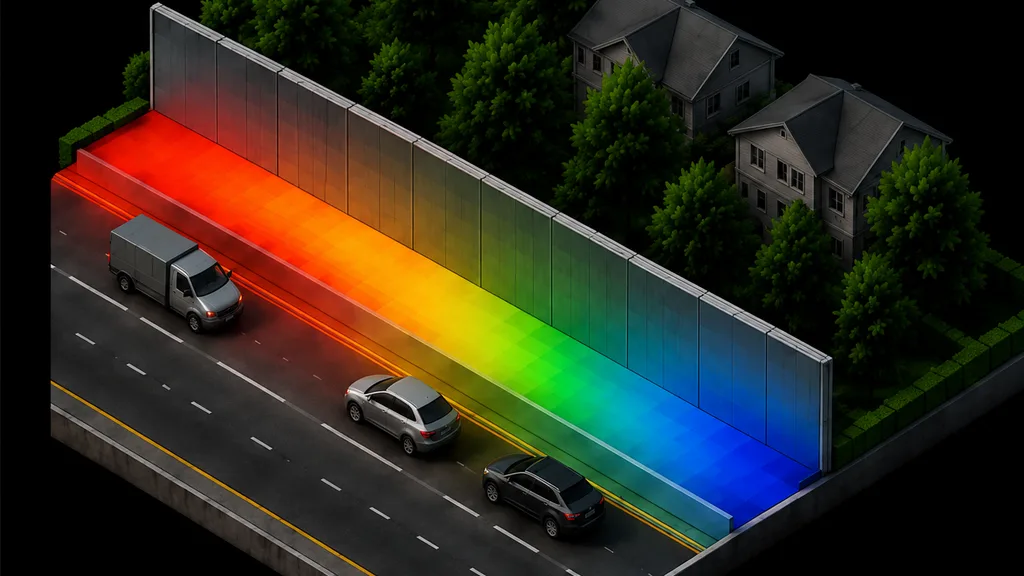
Table of Contents
The noise barrier calculator predicts the sound pressure level at a receiver behind a barrier, per octave band, and compares it against the Indonesian environmental noise limit for the land-use zone you select. It handles a single barrier, two barriers in series, and a building acting as a thick barrier, and it reports the insertion loss the barrier actually buys you rather than just the final level.
This guide lists every field the noise barrier calculator asks for, what to enter, and what each output number means, in the order the interface presents them. Open the outdoor noise barrier calculator in another tab and work through it as you read.
The formula
Outdoor propagation is a subtraction, and the first equation is the whole method: start from the source sound power and take away each attenuation term. Geometric divergence loses six decibels per doubling of distance. Atmospheric absorption is computed from ISO 9613-1 using temperature and humidity, and is strongly frequency dependent. Ground effect follows the ISO 9613-2 alternative method from the mean propagation height. The second equation is the barrier term: the path length difference between going over the top and going straight through, divided by the wavelength and scaled, capped at 20 decibels for a single edge and 25 for a double. One detail the calculator follows and many spreadsheets do not: when a barrier screens the path, the ground attenuation term is set to zero rather than added to the barrier term, because the barrier already accounts for the ground effect it destroys.
Before you start
Four things, and the fourth is the one people skip.
A source level – Either a sound power level, or a sound pressure level measured at a stated distance. Octave band data is far better than a single figure, because barrier performance and atmospheric absorption both change so much across the spectrum that a single-frequency answer can mislead in either direction.
The geometry – Source to receiver distance, and the heights of both above ground. Receiver height matters more than people expect: the barrier that shields a ground-floor window may do almost nothing for a second-floor bedroom, because the line of sight clears the top.
The barrier – Its position along the path and its height. Position matters as much as height, and the tool makes the reason visible.
The land-use zone – Which limit the result is judged against. A prediction with no limit beside it is not an assessment.
Input fields
Every control the noise barrier calculator asks for, grouped by the panel it sits in, and listed in the order you meet it on screen.
Getting started
Load example – Fills a worked case: an eight-band source, 30 m source to receiver, source 1.2 m and receiver 1.5 m above ground, a single 4 m barrier 5 m from the source, mixed ground, 30 degrees Celsius and 80 per cent humidity, judged against the housing zone limit. It populates the inputs only. You still press Generate result to get an answer.
EN / ID toggle – Switches the whole interface between English and Indonesian. On the ALTA Integra site this follows the page language automatically.
Source
Single frequency or octave bands – Single frequency asks for one level and one frequency. Octave bands asks for eight levels, from 63 Hz to 8 kHz. Band mode is the honest choice for a real source.
Sound power Lw or measured Lp – Sound power is the source's own emission, independent of where you stand. Measured pressure is what a meter read at a stated distance; choose it and a reference distance field appears, and the calculator inverts the divergence term to recover the power before it does anything else.
Level fields – One per band in band mode, or one plus a frequency in single mode. Enter unweighted levels; the A-weighting is applied by the calculator when it sums the bands.
Reference distance – Appears only for a measured pressure level. The distance the measurement was taken at.
Geometry
Source to receiver distance – Horizontal, in metres.
Source height and receiver height – Both above local ground. These two set the line of sight, and the line of sight decides whether the barrier does anything at all.
Barrier configuration – None for a free-field prediction, single for one barrier, double for two in series, or building to model a thick obstacle by placing two diffraction edges a wall thickness apart.
Barrier position and height – Distance from the source, and height above ground. The calculator validates that the barrier sits between source and receiver, and for a double configuration that the second barrier sits beyond the first.
Second barrier position and height – Appears for the double configuration.
Building thickness – Appears for the building configuration. The separation between the two diffraction edges.
Draggable markers – The section drawing lets you drag the source, the receiver and either barrier directly. Useful for finding the position that works before committing to numbers.
Conditions
Ground – Hard, mixed or soft, which sets the ground factor. Hard ground reflects and can raise the level above free field; soft ground absorbs.
Temperature and relative humidity – Feed the ISO 9613-1 atmospheric absorption coefficient. At 63 Hz the effect is negligible over any practical distance; at 8 kHz it can dominate everything else, which is why a distant road sounds like a rumble rather than a hiss.
Method – ISO 9613-2 or a CNOSSOS-EU style diffraction term. The two differ in how strongly they weight the path length difference.
Zone – The land-use category, which sets the limit. Eight are offered, matching the Indonesian environmental noise regulation.
Reading your result
Press Generate result and the panel fills in. Nothing appears before that, and nothing appears until the checklist is complete.
Total level and unit – The headline. In band mode this is the A-weighted sum across all eight bands in dB(A); in single-frequency mode it is the level at that frequency, with the A-weighted equivalent shown alongside so the comparison against a dB(A) limit is explicit.
Level without the barrier – The free-field prediction for the same geometry.
Insertion loss – The difference between the two, and usually the most useful number in a design conversation. It is what a client is actually buying. A barrier that brings a receiver from 61 to 45 dB(A) has earned its cost; one that delivers two decibels has not.
Attenuation breakdown – A running subtraction, term by term: sound power, then divergence, atmospheric absorption, ground and barrier, with the level after each step. This is what makes an unexpected result diagnosable rather than mysterious.
Per-band table – Sound power, divergence, atmospheric absorption, ground, barrier, and the resulting pressure and A-weighted level for every band. This is where the design insight lives. Barriers are poor at low frequency because the wavelength is long relative to the path difference, so a barrier that handles a 1 kHz tyre hiss well may leave a 63 Hz engine rumble almost untouched.
Verdict pill and zone limit – Pass or fail against the selected zone, with the margin.
Geometry and assumptions – The propagation distance actually used, the path length difference, the ground factor, the temperature and humidity, the method and the barrier configuration. If the barrier does not break the line of sight the tool says so here rather than silently returning a free-field answer.
Email me this result – Sends the breakdown, the per-band table and the geometry to the address you identified with.
Common mistakes
Working in a single frequency. It is the fastest way to get a confidently wrong answer, in either direction, because the two most frequency-dependent terms in the whole calculation are barrier attenuation and atmospheric absorption.
Assuming a taller barrier is the answer. Moving a barrier closer to the source or closer to the receiver lengthens the diffraction detour for the same height, and is often cheaper than building higher.
Checking only the ground floor. Raise the receiver to the highest affected window. That is usually where the barrier stops working.
Adding ground attenuation on top of the barrier term. The standard replaces one with the other. Adding both flatters a barrier by several decibels on soft ground, and this calculator deliberately does not do it.
Forgetting the barrier has to be solid. The calculation assumes sound diffracting over the top dominates sound passing through. A barrier with an open joint at the base can lose most of its performance, and no formula here will tell you.
Treating the prediction as an assessment. One source, one path, flat ground. A real site has several sources, reflections and terrain.
When the noise barrier calculator is not enough
This is one source, one receiver, one path, over flat ground. Four gaps matter.
Multiple sources and reflections. A real road is a line source, a real site has several sources at once, and reflections off a facade opposite, off a parallel barrier or off hard ground between obstacles are not modelled. A reflective barrier facing a building across a street can make things worse rather than better.
Terrain. Flat by assumption. A berm, a cutting, a slope or a change in level all alter the geometry, and a berm can outperform a wall for the same cost.
Transmission through the barrier. Not modelled. The assumption is a barrier heavy enough and sealed enough that diffraction dominates, which is a real surface mass requirement and a real detailing requirement.
Statistical weather. The meteorological correction represents one downwind condition, not a year of conditions, and the ground term uses the standard's simplified alternative method applied per band as an approximation.
Treat the output as early-design sizing, the right tool for deciding roughly how tall a barrier needs to be and where to put it. Environmental noise work is part of ALTA Integra's acoustic consultant practice; if you need a full assessment with measured source data, multiple sources, reflections, terrain modelling, noise mapping or compliance reporting, talk to the team.
FAQ
Should I use single frequency or octave bands in the noise barrier calculator?
Octave bands, whenever you have the data. Barrier attenuation and atmospheric absorption are both strongly frequency dependent, so a single-frequency run can overstate or understate the real broadband result by a wide margin. Single frequency is useful for a quick sanity check or when only a tonal component matters.
Why does moving the barrier change the result as much as raising it?
Because the barrier term depends on the path length difference between diffracting over the top and travelling straight through. A barrier close to the source or close to the receiver forces a longer detour than the same barrier standing in the middle of the gap, so position buys attenuation the same way height does, often for less money.
What does insertion loss mean here?
The difference between the predicted level with the barrier and the level without it, for the same geometry and conditions. It is the figure that describes what the barrier is doing, as opposed to the absolute level, which also reflects distance, ground and air absorption. It is usually the right number to put in front of a client.
Why is my barrier doing almost nothing at 63 Hz?
Because at 63 Hz the wavelength is around five and a half metres, which is large relative to the extra distance sound travels going over the barrier. Diffraction attenuation scales with that path difference divided by the wavelength, so low frequencies bend around a barrier far more easily than high ones. This is physics rather than a modelling limitation, and it is why barriers work better on tyre noise than on engine rumble.
Which zone limits does the calculator compare against?
The eight land-use categories in the Indonesian environmental noise regulation: housing and settlement at 55 dB(A), trade and services at 70, offices and commerce at 65, green open space at 50, industry at 70, government and public facilities at 60, recreation at 70, and hospitals, schools and places of worship at 55. Select the zone and the verdict compares the A-weighted prediction against that figure.
Who provides environmental noise consulting in Indonesia?
ALTA Integra provides environmental and architectural acoustics consulting across Indonesia, including environmental noise assessment with measured source data, multiple sources and reflections, terrain modelling, noise mapping, barrier design and compliance reporting. The calculator is the early-design tool; the assessment is the deliverable.