How to Use the PAG/NAG Calculator
A field by field walkthrough of ALTA Integra's PAG/NAG calculator, covering how to measure the five critical distances, read the NOM and FSM report rows, and interpret the stability verdict.
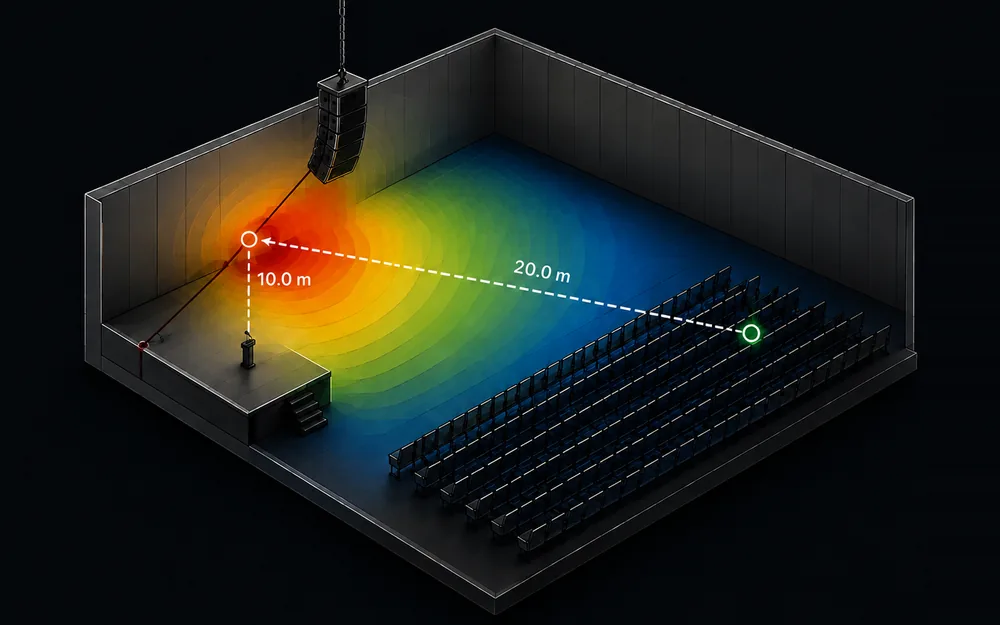
Table of Contents
The PAG/NAG calculator tells you whether a sound reinforcement design has enough gain before feedback to cover a room. Enter the room dimensions and the position of the talker, the microphone, the loudspeaker and two listener seats, and the PAG/NAG calculator returns Potential Acoustic Gain against Needed Acoustic Gain, plus the margin between them.
That margin is the decision. A positive PAG minus NAG means the system has headroom before it rings. Drop below zero and the layout falls short of covering the room as drawn, and no amplifier fixes that.
The formula
Both numbers are level ratios in decibels, built from five distances measured off the plan.
A positive margin is headroom before ringing. A negative one means the layout as drawn cannot cover the room, and no amount of amplifier will change that.
- D0 - talker to the farthest listener.
- D1 - microphone to loudspeaker.
- D2 - loudspeaker to the farthest listener.
- Ds - talker to microphone.
- D3 - talker to the nearest listener.
- NOM - number of open microphones.
- FSM - feedback stability margin, in decibels.
Before you start
- A scaled floor plan or seating layout, on paper or in CAD, with five positions marked: talker, microphone, loudspeaker, nearest listener, furthest listener.
- A laser measure or a scale rule, to read D₀ and Dₛ off the drawing rather than estimating them by eye.
- The talker's mouth height, from the platform or floor level the talker actually uses, standing or seated.
- The microphone model and mount height, from the AV schedule or the podium drawing.
- The loudspeaker's mounting height, from the reflected ceiling plan or the AV schedule.
- Your project's real open microphone count, from the console or automixer's channel list, since the PAG/NAG calculator never asks for it.
- The microphone and loudspeaker models you plan to specify, since a manufacturer's own datasheet for pickup pattern and directivity matters once this first pass is done.
PAG/NAG calculator input fields
The PAG/NAG calculator lays out its fields top to bottom: header controls, then three columns, ROOM, HEIGHTS ABOVE FLOOR and DISTANCES, each written below in the order the interface presents it.
Header controls
These two controls sit above the three field columns in the PAG/NAG calculator and apply to every field below them.
m / ft - Switches every field in the PAG/NAG calculator between metres and feet. Displayed values convert automatically, but a typed number is read in whichever unit is active at that moment.
Load example - Fills a 7 by 12 by 3 m room with a talker, microphone, loudspeaker and two listener positions already placed, the fastest way to see a complete result.
Room
WIDTH - Room width, in the current unit, measured wall to wall at the widest usable point. Steps in 0.5, minimum 1, no set maximum.
DEPTH - Room depth, talker's wall to the back wall, in the current unit. Pace it out on site or scale it off a drawing. Steps in 0.5, minimum 1.
HEIGHT - Ceiling height, in the current unit. Use the lowest clear height if the ceiling steps or slopes. Steps in 0.5, minimum 1.
Heights above floor
Talker - Height of the talker's mouth above the floor. Defaults to 1.6 m, a standing figure. Steps in 0.05, minimum 0.
Microphone - Height of the microphone capsule above the floor. Defaults to 1.45 m, close to the talker's mouth. Steps in 0.05, minimum 0.
Loudspeaker - Height of the loudspeaker's acoustic centre above the floor. Defaults to 2.6 m, typical for a ceiling or wall mount. Steps in 0.05, minimum 0.
Listeners - Ear height for both the near and far listener positions. Defaults to 1.15 m, a seated estimate. Steps in 0.05, minimum 0.
Distances
D₀ (Talker to furthest listener) - The room's longest sightline. On a real plan this should be the largest of the five distances. Steps in 0.05, minimum 0.05.
D₃ (Equivalent acoustic distance) - Talker to nearest listener, the comfortable listening target the NAG side of the PAG/NAG calculator uses. Read it from the closest seat a listener will actually occupy. Steps in 0.05, minimum 0.05.
Dₛ (Talker to microphone) - Almost always under a metre, and the single strongest lever on the PAG result. On a real plan this should be the smallest of the five distances. Steps in 0.05, minimum 0.05.
D₁ (Mic to nearest loudspeaker) - A larger D₁ raises the available PAG, so keep the loudspeaker as far from the microphone as the room allows. Steps in 0.05, minimum 0.05.
D₂ (Loudspeaker to furthest listener) - A shorter throw raises the available PAG, so use whichever loudspeaker sits physically closest to the seat being checked. Steps in 0.05, minimum 0.05.
Every distance field also accepts a dragged marker in the side elevation instead of typed entry, whichever matches the data in hand, a tape reading or a scaled drawing.
| Field | Section | Unit and step | What it sets |
|---|---|---|---|
| WIDTH | ROOM | m/ft, step 0.5 | Room width |
| DEPTH | ROOM | m/ft, step 0.5 | Room depth |
| HEIGHT | ROOM | m/ft, step 0.5 | Ceiling height |
| Talker | HEIGHTS ABOVE FLOOR | m/ft, step 0.05 | Mouth height, default 1.6 m |
| Microphone | HEIGHTS ABOVE FLOOR | m/ft, step 0.05 | Capsule height, default 1.45 m |
| Loudspeaker | HEIGHTS ABOVE FLOOR | m/ft, step 0.05 | Acoustic centre, default 2.6 m |
| Listeners | HEIGHTS ABOVE FLOOR | m/ft, step 0.05 | Ear height, default 1.15 m |
| D₀ (Talker to furthest listener) | DISTANCES | m/ft, step 0.05 | Talker to the back row |
| D₃ (Equivalent acoustic distance) | DISTANCES | m/ft, step 0.05 | Talker to nearest listener |
| Dₛ (Talker to microphone) | DISTANCES | m/ft, step 0.05 | Strongest PAG lever |
| D₁ (Mic to nearest loudspeaker) | DISTANCES | m/ft, step 0.05 | Raises PAG when larger |
| D₂ (Loudspeaker to furthest listener) | DISTANCES | m/ft, step 0.05 | Raises PAG when shorter |
These twelve fields are the whole form. Every one must carry a value before Generate result becomes active.
Generate and reset
These two buttons sit beside the verdict panel once the PAG/NAG calculator's twelve fields are complete.
Generate result - Calculates the PAG/NAG calculator's NAG, PAG and margin figures. Stays disabled until all twelve ROOM, HEIGHTS ABOVE FLOOR and DISTANCES fields carry a value.
Reset - Returns every field to the Boardroom preset's own numbers, four open microphones and a 6 dB margin included.
Reading your result
PAG minus NAG - The decision number for the PAG/NAG calculator, shown with its sign. It reads STABLE: SAFE TO SPECIFY when positive and UNSTABLE: WILL FEED BACK when negative, and zero is the exact boundary the calculation draws.
NAG - Needed Acoustic Gain, carrying the note "Gain the room needs", the amplification the furthest seat requires to match what the nearest seat hears with no system running at all.
PAG - Potential Acoustic Gain, carrying the note "Gain the system has", the maximum gain the geometry allows before the microphone and loudspeaker ring into feedback. Both numbers in the PAG/NAG calculator come from the same twelve fields above.
NOM (report row, no input field) - Labelled Open microphones (NOM) in the report, the open microphone count the calculation assumed, coming from whichever preset the geometry was loaded from. Defaults to 1. Nothing in the form lets you change it.
FSM (report row, no input field) - Labelled Feedback stability margin (FSM) in the report. The margin the calculation used, fixed at 6 dB for this embed, though the PAG/NAG calculator supports 0 to 12 dB. Nothing in the form lets you change it.
Positive margin - Ten decibels or more usually means the layout has slack to absorb a change later, a bigger crowd, a longer throw, an extra open microphone.
Negative margin - Does not mean the arithmetic is wrong. It means the room asks for more gain than the geometry can deliver before feedback, and no amplifier fixes that gap.
Common mistakes
- Swapping D₀ and Dₛ. Produces an absurdly large or wrong-signed margin, since Dₛ should read as the smallest of the five distances and D₀ the largest. Check the DISTANCES column before trusting a result that looks unusually good or bad.
- Trusting the PAG/NAG calculator's verdict without checking NOM. A comfortable looking margin can be built on the default of one open microphone while the real session runs four or six live channels.
- Leaving the height fields at their defaults. A ceiling speaker at 4 or 5 m, or a raked floor, shifts every distance, since each combines plan distance with height difference. Update all four before trusting the result.
- Typing a distance in the wrong unit. Switching to feet and typing a metric reading straight in shrinks the stored distance to about a third of what was meant, an error the on-screen number will not flag.
- Assigning D₂ to the wrong loudspeaker. D₂ needs the box nearest the back row seat being checked, which in a room with a delay or fill zone is rarely the main cluster near the stage.
- Assuming Reset clears NOM and FSM. Reset silently reloads the Boardroom preset's own four microphones and 6 dB margin over whatever the calculation was using before, changing the report rows with no field to show it happened.
When the calculator is not enough
The PAG/NAG calculator models one talker, one open microphone position and one loudspeaker, checked against the nearest and furthest listener seats. It also cannot know how the room actually sounds once built and full of people, so reverberation, absorption and loudspeaker directivity all pull the real margin away from the free field number it returns, sometimes by several decibels either way.
NOM is the sharpest version of this limit. It reflects only the preset's own assumption, fixed the moment that preset loaded, with no field anywhere to correct it for a real project. Each time the open microphone count doubles, available PAG drops by roughly 3 dB, so a six-channel session checked against a one-microphone result can sit several decibels off, enough to flip a stable system unstable.
Recompute PAG by hand with the real microphone count before trusting a margin that looks too comfortable, and treat any result within a couple of decibels of zero as a signal for a full design review rather than a final answer. Audio Engineering Society practice and equipment manufacturer data both carry a cleared PAG/NAG check further. ALTA Integra carries a cleared check through room acoustics, loudspeaker performance and on-site measurement, drawing on loudspeaker and DSP manufacturer data, before a system is specified.
FAQ
What do D0, D1, D2, D3 and Ds mean in the PAG/NAG calculator?
They are the five distances the PAG/NAG calculator measures on your plan. D₀ runs talker to furthest listener, D₁ mic to nearest loudspeaker, D₂ loudspeaker to furthest listener, D₃ talker to nearest listener, and Dₛ talker to microphone. Read them off the DISTANCES column after you place the five markers.
Why is the Generate result button greyed out?
In the PAG/NAG calculator, Generate result stays disabled until all twelve fields in the ROOM, HEIGHTS ABOVE FLOOR and DISTANCES columns carry a value. Fill the room dimensions, all four heights and all five distances, either by typing or by dragging the markers in the side elevation, and the button becomes active.
Can I change the microphone count or margin in the PAG/NAG calculator?
No. In the PAG/NAG calculator, NOM and FSM have no field anywhere in the form, so you cannot type either one in. NOM is fixed by whichever preset the geometry was loaded from, one microphone by default, and FSM is fixed at 6 dB for this embed. Read both from the report rows after Generate result and recompute by hand if your project's real microphone count differs.
What counts as a good PAG minus NAG margin?
Any margin at or above zero decibels is stable, and the PAG/NAG calculator's own verdict line confirms it. A margin of several decibels or more gives room to absorb a bigger crowd or a longer throw later. A margin close to zero deserves a second look once real acoustics and hardware enter the design.
Does the PAG/NAG calculator account for room acoustics or loudspeaker directivity?
No. The calculation treats every source as radiating equally in all directions through open air, so reverberation, absorption and real loudspeaker directivity all sit outside it. Use the PAG/NAG calculator to catch an unworkable layout early, then move to full acoustic modelling before signing off a design.
Can I switch between metres and feet in the PAG/NAG calculator?
Yes, a toggle in the header switches every field between metres and feet, converting displayed values automatically. Whatever number you type is read in the unit currently selected, so confirm the toggle matches your tape measurements before entering figures.